As an Amazon Associate I earn money from qualifying purchases.
Showing posts with label websites. Show all posts

Tuesday, August 26, 2025

Welcome to the GPU Hierarchy


Hey there! If you're a long-time reader of my blog (all ten of you), you're going to see a name change. I've rebranded as The GPU Hierarchy, and testing of graphics card performance will be my primary goal going forward.

What started out as a blog about cryptocurrency mining WAAAY back in the day has morphed quite a bit. I haven't done any mining in years, as it has become generally unprofitable — especially considering the upfront hardware costs — but I do know a lot about graphics cards. If you know who I am and my employment history, that shouldn't be a surprise, but I'm going to try to stay mostly anonymous here.

Yes, it's been about two years since I wrote anything here. My full-time job was keeping me very busy. Now I've got a bit more freetime, so I'm going to put that to good use.

I've been testing (and retesting...) all of the modern graphics card for a while, and I'm going to start publishing a full suite of performance results. We'll have tables and charts of performance data, along with power, efficiency, and other metrics. Everything will be linked to Amazon listings (or at least a search of Amazon listings), which helps support the site. But more importantly, I want this to become a great resource for people looking to purchase or upgrade their gaming GPU.

I've assembled a test suite of 15 reasonably modern games, three of which have ray tracing effects enabled. That's 20% of games with RT enabled, and I feel that's probably about as much weight as ray tracing deserves. Upscaling and frame generation techniques will be left off, because I view those as performance enhancements rather than baseline measurements.

To be clear, I routinely enable DLSS and FSR when gaming, but fundamentally those differ in appearance — with XeSS being the red-headed stepchild that differs yet again. Plus we now have DLSS 2/3/4, FSR 2/3/4, and XeSS 1.x/2.x as options, all of which look and perform differently! Perhaps that's a story for another day and some deeper investigations, but for now we'll stick with reference performance.

So, welcome back if you've been here before (when it was hosted at HolyNerdvana). If you're new, welcome to my graphics card blog and site. I'm a veteran of the GPU industry, having tested and reviewed a variety of hardware for over two decades. I know a lot about GPUs and graphics cards, I have a variety of opinions, and this is where I'll be sharing them now.

This is a fully independent website, meaning there's no big publisher telling me what to write, when to write it, and how often I should spend a long weekend looking for BS Black Friday, Prime Day, Labor Day, etc. deals. Just the straight stuff here. I hope you find it useful, and comments are welcome. Note also the general lack of advertising, which should hopefully mean the pages load quickly. If things go well, maybe I'll get some sponsorships, but I hope to keep such things to a minimum — a throwback to the good old days of the web.

Monday, November 25, 2013

Trying to Sign Up for ObamaCare: WAHealthPlanFinder Edition

So the open enrollment is going on with Obamacare, and I figured with all the hoopla I would look into it and see how bad things really are. I'm a technical guy, so I figure if I can't get a site to work then probably no one can. But, I live in Washington, so we don't use the HealthCare.gov site -- we have our own exchange just for the state of WA: www.wahealthplanfinder.org. Catchy name, isn't it? What follows is my journey into how NOT to do things if you're trying to sign up. I've snagged a bunch of images, grayed out names and dates, but otherwise this is what you'd experience if you follow the same steps.


You start at the home page, and there are several large buttons calling for attention: Find and Compare Health Plans, Apply for Coverage, and in the bottom-right is the sign-in section. Naturally, first time users don't have an account yet, but there's an option down there: Create an account. Again, I'm a tech savvy person, so I figured I'd just jump right in and start with creating an account. This, it seems, was a terrible mistake.


Creating an account was pretty straightforward -- choose a user name (it has to have at least six characters with one number and one letter, with a maximum length of 20 characters. The password requirement is a bit more strict: at least eight characters, 1 UPPERCASE letter, 1 lowercase letter, 1 number, and 1 special character. Enter your email address, pick and answer three security questions, agree to the Conditions of Use, and you're done. Ready to search for plans and apply for coverage now? TOO BAD! Here's what you get:


Hmmm...strange, there doesn't seem to be anything to do. Maybe it's under one of the other options on the site? Well, I checked around and it appears that's not the case. The home page in particular has now changed quite a bit, as all you can do is watch a tutorial video or go back to the useless dashboard. So that's a problem, but I thought after a bit maybe they just want me to search for a plan and then apply, so let's try that.

To find a plan at all, you need to first sign out -- which makes zero sense. Finding and comparing plans when you're lot signed in is easy enough, though -- give the site your zip code, birthdates and sex (and smoking/pregnant status if needed), add household members, and then input your household income. Search for plans, and in my case I get the following:

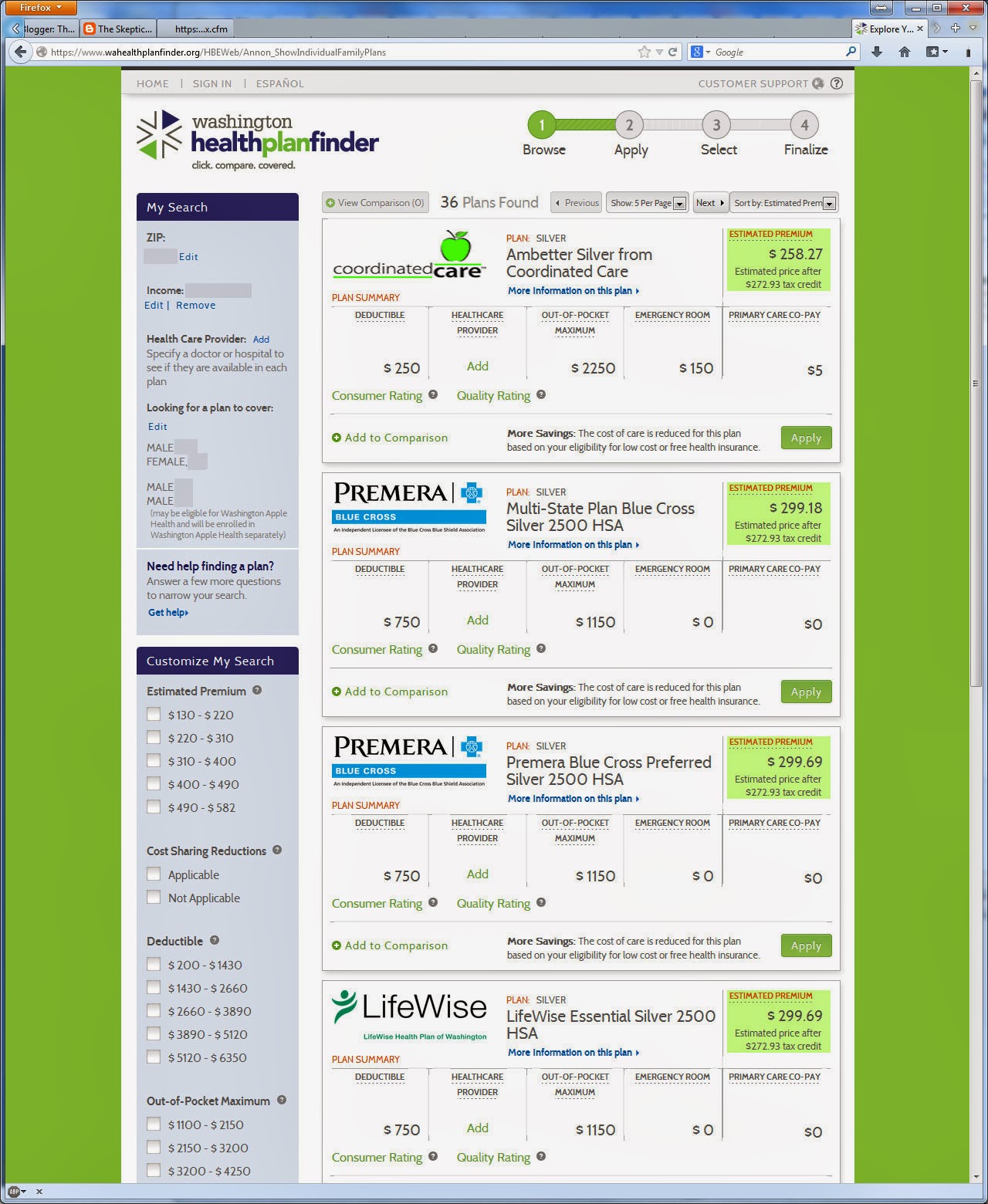
Huzzah! Check out all these plans! And with four people and a household income under $60K, there are some subsidies available (with higher subsidies for lower incomes). So far so good. Since my family is already with Group Health and we're okay with the care we've received there, let's just limit things to the Group Health options:

The Silver plan looks pretty good, so let's go ahead and apply for that....


Oh, now I can log in or create an account! We're getting somewhere. Except, we're not, since I already created an account. If I sign in, I'm back to the empty dashboard. If I try to create a new account, the system figures out that I've already created an account (same SSN, after all), and I'm stuck again.

There are a few more pieces of information to tack on, however. First is that the "estimated price after tax credit" figures are apparently a joke -- you'll pay more than this unless you're on Medicaid, from what I've read elsewhere. And that's apparently assuming your application is even accepted, which it might not be -- if it was guaranteed, you wouldn't be applying, right? Of course, you have to go through the site if you want any chance at a tax credit; skip the exchange and you're stuck paying the full price no matter what.

My bet: even if I happen to qualify for a tax credit, it will likely end up being smoke and mirrors. If I get a $200 tax credit on my health insurance but my other federal taxes end up being $300 higher, it's a net loss of $100. And as I've mentioned before, with all of the people now guaranteed the ability to get some form of coverage (if you can't get accepted on an application, you can always go with the single provider government option), I suspect a tax rate hike is coming down the pipe.

I'll be trying to make some phone calls this week to see if I can get to the "apply" stage, which will likely require some serious time on hold. Wish me luck....

Monday, February 25, 2013

Weather.com Needs Improvement

Okay, this isn't necessarily hardware related, but websites qualify as something techy, right? So if I want to rant about a website with some stupid algorithms, I'm totally allowed to do so! Especially since this is my blog so I can do whatever I want. With that out of the way, let me talk to you a bit about Weather.com, or The Weather Channel if you prefer. Simply put, their forecasting is woefully inadequate.

Over the past couple of weeks, I've been trying to find good times to go outside for a bike ride. As any cyclist can tell you, riding in the rain can be a bit of a mess, especially when you're on a road bike doing 15-25 miles per hour. The tires kick up all sorts of spray, your face, feet, and hands can all get quite cold, and this is to say nothing about what all that grit does to your expensive bike! Long story short, I'm more of a fair weather cyclist that prefers avoiding the rain. As you can imagine, in the northwest (in Olympia, WA area), this can be quite a task.

During my quest for decent cycling weather, I have had quite a few mishaps of late. Three Saturday's back, the forecast was a 0% to 10% chance of rain for the next four hours; I got soaked. The next Saturday was the same story: 0% chance of rain got me 100% wet. Then on Wednesday I also checked Weather.com and was greeted with a 0% rain forecast that left me dripping wet. Hmmm.... So you can imagine my concern when I saw the following forecast for today:
Once bitten, twice shy as the saying goes...or, "Fool me once, shame on you. Fool me twice, shame on me." Looking out my window also gave me further reason for concern, as the skies were alternating between sunny and severely overcast on a regular basis. If the weather was "partly cloudy", I've got some beachfront property I'm willing to sell at a great price!

But here's where it gets interesting: Weather.com has a satellite map available, which I haven't looked at much, so I decided to give it a shot. Upon opening the map, you have two options: Past and Future. I started at Future, thinking it would be more useful than knowing what had happened of late. Here's the prediction for the next 15 minutes:
Gosh, that's looking pretty good. In fact, looking at the next several hours of the map showed similarly clear skies. Was I potentially missing something? Maybe my windows were broken and it really wasn't as gloomy looking as it seemed? Then I thought I'd quickly check the recent past to see what that looked like. Umm, here's the most recent 15 minutes:
If you open those two images and flip between them, you'll quickly understand why I say that Weather.com needs to improve their prediction algorithms. As far as I can tell, that prediction is based on what they saw probably some time yesterday, and as you get farther away from the time the prediction was made, things become a lot more dicey. The fact that they have the most recent Doppler images from the satellites showing rain all around my area would lead me to think that the next couple of hours are likely to continue that pattern. Sure enough, not ten minutes later the rain started coming down so hard that I didn't even need to look out the window to know it was seriously wet. Bike ride: cancelled; time for a jog in the rain instead (since 6 miles per hour isn't nearly as rough in the rain).

This should be a reasonably easy fix; I mean, sure, if you're trying to predict the next 10 days of weather, or a month in advance, I don't expect extreme accuracy. For the next day or two, though, I want it a good prediction, and for the next couple hours you better get it right. A relatively simple script ought to be able to predict the next couple hours quickly and accurately -- far better than a complex calculation that was run 24 hours in advance.

Something else they need to do for their weather map is to stop using animated GIFs. Seriously, what is this, 1999? Animated GIFs are far more bandwidth intensive than a JPG image and using Flash to overlay the weather. But then, I don't think Weather.com has been substantially updated in at least five years other than to maybe add more advertisements. Blech. So here's the question: does anyone have a better website for getting accurate weather predictions for the next few hours? Because Weather.com just isn't doing it for me.

BTC: 1JSrAuxPUhD2rS6yYLiPPT6X8fvz7c7k1W